3.3 KiB
dotfiles
My personal dotfiles. They are meant to be used on a Fedora Workstation install.
Installation
Install GNU Stow.
sudo dnf install stow
Clone dotfiles into home folder.
git clone https://git.nevereverever.de/never/dotfiles.git ~/.dotfiles/
Stow configuration using stow.
cd .dotfiles/
stow ./
Install necessary software.
sudo dnf install fish niri brightnessctl waybar fuzzel mako swaylock swaybg swayidle alacritty
Change the shell to fish.
chsh -s /usr/bin/fish
Additional Software
Neovim
My neovim config requires version 12 or higher. If the Fedora repos don't have
it, build it from source.
Install @c-development and cmake before compiling and use (8) concurrent jobs with the -j 8 option.
Also install tree-sitter-cli.
TeXLive
Similarly the TeXLive version in the Fedora repos are not up to date. Use the manual installation.
Also installing a PDF viewer with synctex support is recommended
Sioyek
Build the development branch of sioyek. Install the packages.
sudo dnf install qt6-qtbase-devel qt6-qtbase-static qt6-qt3d-devel harfbuzz-devel qt6-qtsvg-devel qt6-qtspeech-devel
Luakit
Build the develop branch of Luakit. Install the packages.
sudo dnf install gtk3-devel webkit2gtk4.1-devel sqlite3pp-devel luajit-devel lua5.1-filesystem
mpd
Install mpd.
sudo dnf install mpd
Configure mpd.
mkdir ~/.local/share/mpd ~/.local/state/mpd
Install an mpd client.
sudo dnf install mpc
Or a graphical mpd client. Flathub repo required.
flatpak install de.wagnermartin.Plattenalbum
Image creation
The usual stuff.
sudo dnf install ipe gimp inkscape blender
Music creation
Enable the audinux copr repo.
sudo dnf copr enable ycollet/audinux
Install the software.
sudo dnf install ardour8 drumgizmo caps-lv2 lv2-x42-plugins
Miscellaneous
For some RPM Fusion (Non) Free repos or Flathub are needed.
-
Fedora Repos
keepassxcevolutionqt6ctplasma-breeze-qt6
yt-dlplua@c-development
-
RPM Fusion
steam
-
Flathub
org.gnome.World.PikaBackupapp.drey.EarTagorg.signal.Signalcom.modrinth.ModrinthAppde.bund.ausweisapp.ausweisapp2io.github.finefindus.Hieroglyphic
Tuxedo laptop drivers
Install the Tuxedo Fedora repos.
Install the Tuxedo Control Center and the LAN Module drivers
sudo dnf install tuxedo-control-center tuxedo-yt6801
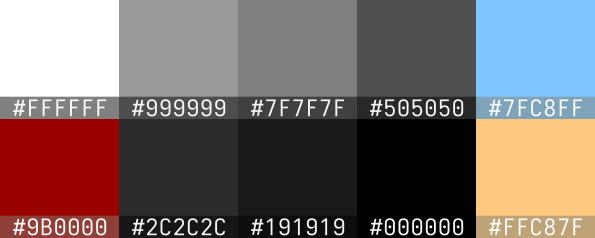
Colors
| Color | Description |
|---|---|
| #ffffff | fg0/text |
| #999999 | fg1 |
| #7f7f7f | fg2/border |
| #505050 | fg3/border/inactive |
| #2c2c2c | bg2/border/highlight |
| #191919 | bg1 |
| #000000 | bg3 |
| #7fc8ff | primary accent/active |
| #ffc87f | secondary accent |
| #9b0000 | urgent |